
How Resonate Works
Got a drum sounding exactly right? Resonate records that sound and guides you back to it next session, after the heads settle overnight, or toward a hit from a recorded drum you love. It also takes a cold, untuned drum to both heads verified, even, and dialed in as a system, lug by lug, measurement by measurement. We won't make you crack open a textbook, watch lengthy tutorials, or bore you with facts and figures just so you can use the app. Instead, Resonate gives you a clean, easy-to-understand interface while the app does all the heavy lifting behind the scenes. Below, we talk about how each feature is built and why the approach holds up in a loud room, on stage, and after a head change.
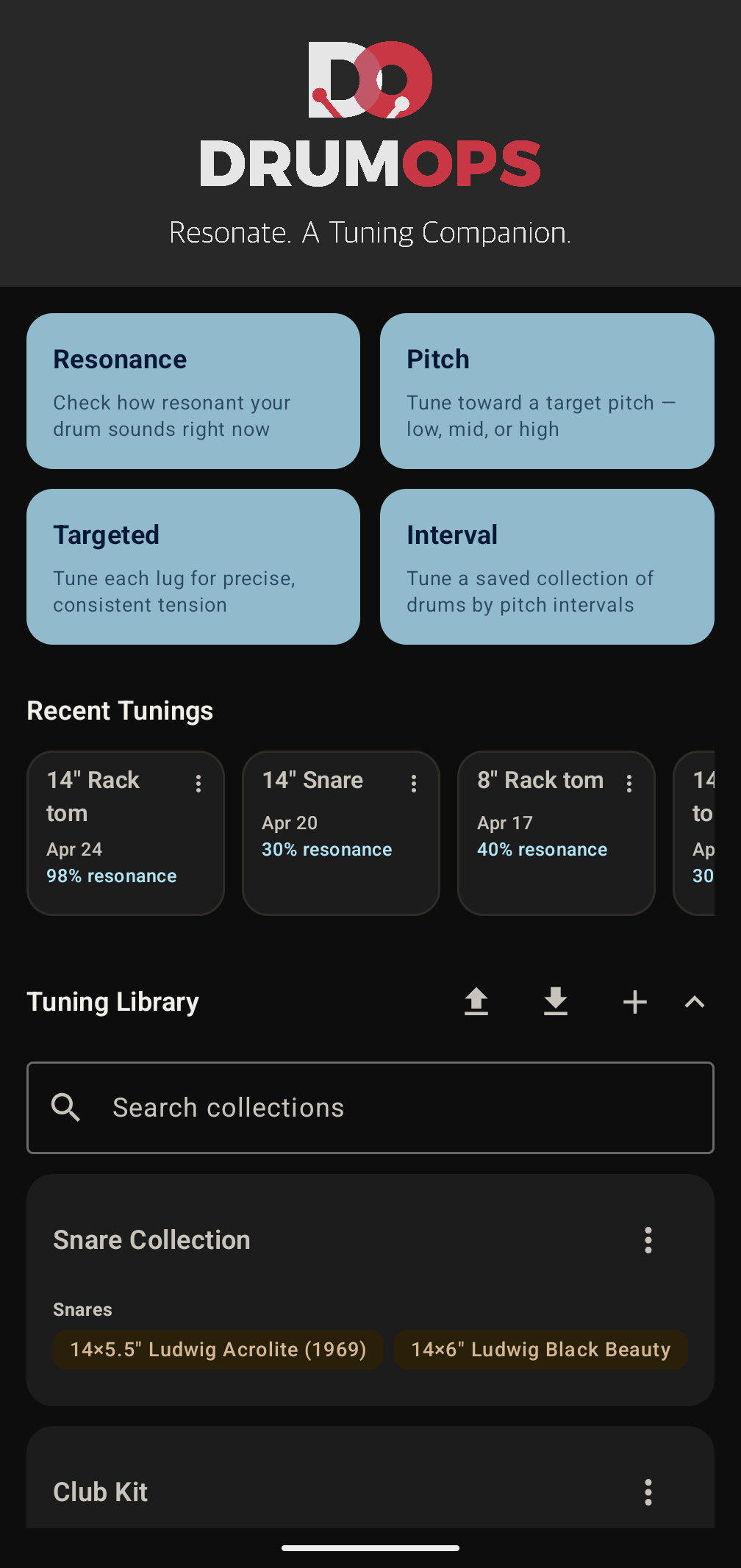
What sets Resonate apart
Most drum tuning apps share the same limitations: a single unverified reading per lug, no way to tune both heads as a coupled system, Hz-only display, and subscription pricing. Resonate was built around the problems drummers actually complain about.
Only in Resonate
- Get your sound back. When a drum sounds right, Fingerprint records it. Next session, after the heads settle overnight, or after a head change, Clone plays that recording back, listens to your strike and tells you what to change first until the two match. It works on any drum you can get near, at a shop, in a studio or at a show, and on a hit from a recorded drum. Resonate keeps the sound itself, not a number, and analyses it afresh on every comparison. No competing app tunes you back to a real sound rather than an abstract Hz value.
- Both heads, tuned as a system. The pitch relationship between batter and resonant head is one of the most powerful controls over a drum's character. Most tuners treat the two heads as unrelated separate sessions. Resonate treats the drum as what it is, a coupled system, and shows you the interval between heads after both are complete.
- Composite resonance scoring alongside pitch. Beyond per-lug pitch readings, Resonate scores each head on three independent acoustic properties, pitch stability, sustain duration and harmonic cleanliness, combined into a single score from 0 to 100. No competing app provides a composite acoustic quality score at the head level.
- Trailing decay used to measure resonance quality. Most tuners snapshot pitch at a single moment and stop listening. Resonate keeps listening through the full ring-out, measuring how long the drum sustains and how cleanly it decays. A drum that pitches correctly but dies immediately scores differently from one that rings with control, a distinction no competing app makes.
- Export and rebuild your collections. No competing app lets you back up what you have catalogued. Resonate exports every collection and every drum as an .xlsx file that you own and can keep anywhere. Import it on a new device, or fill the sheet in yourself to seed a fresh collection before you have tuned a single drum.
- Kit-wide interval tuning, not just per-drum targets. Pick a collection, pick the drums, and measure one of them as your reference. Resonate lists standard note pitches an octave either side of that drum's note, with the interval each one makes, and you choose the note for every other drum yourself. You are tuning the kit to a drum you own rather than to numbers an app picked for you. No competing app carries a chosen set of intervals across a whole kit in one session.
- Unlimited tuning library, not a capped one. Many drum tuning apps limit how many kits or drums you can save. Resonate imposes no cap. Your full kit, snare collection, touring kit, studio kit, every drum, as many collections as you want.
- Pitch tuning with a target you set yourself. Drag a full-span vertical slider to the pitch you want, or type it in. Low, Mid and High are shaded reference zones on that slider showing where drums like yours usually sit, and the slider runs past them at both ends. A live meter shows where your drum sits against your target, and an accuracy score from 0 to 100 updates as you tune.
Done better than the rest
- Three measurements per lug, not one. Resonate takes three steady hits and records their median, the middle value, so one odd strike sits at an end and cannot pull the reading with it. Competing apps have been reported to show readings that swing 60 Hz on the same lug. Every hit you play is kept and counted, and if the three spread more than 5% apart the app tells you by how much and leaves the decision to re-hit with you.
- One-tap re-hit from anywhere. Tap any lug on the radar to re-record it without resetting the session or navigating menus. Competing apps have required a full menu reset to retry a single lug.
- An interrupted tuning is still there tomorrow. Switch apps, take a call, or close Resonate entirely, and the home screen offers the unfinished tuning back: how many lugs or drums are still owed, which one is next, and a Discard button if you would rather start fresh. It covers a kit-wide interval tuning as well as a single head. Drummers using competing apps have reported losing hours of data entry when switching away.
- Clockwise, counter-clockwise, or opposite-lug cross pattern. Cross-pattern tensioning is how many drummers tune. Most apps assume clockwise and offer nothing else.
- Reference ranges per drum type, not universal. Low, Mid and High mean different things on a kick than on a snare, a rack tom or a floor tom, so the range Resonate shades for you is the one for that drum type rather than one band applied to the whole kit. The ranges are there to orient you. The target is always the number you set.
- Five named sound character profiles, not generic presets. Open, Balanced, Dry, Warm and Live each describe a sound and playing context: jazz and light acoustic, versatile studio, metal and hip-hop, R&B and vintage, loud stage. Each maps to calibrated signal targets for your drum type. When you run a resonance test, Resonate scores your drum against the profile you chose rather than a universal average, and tells you how closely your drum's acoustic signature matches the sound you're building toward. Competing apps offer generic Low/Mid/High presets with no character context.
- Note names and cent offset alongside Hz. 130 Hz alone doesn't tell you much. C3 −3¢ connects the reading to the rest of your instrument and to the way musicians actually communicate pitch.
- Hear the target pitch through your speaker. Before or during tuning, tap to play the target frequency as an audible tone so you can tune by ear alongside the meter. Most competing apps provide no reference tone at all.
- One purchase. No subscription, ever. Resonate is a paid app, and every feature is included the moment you buy it. No tiers, no in-app purchases, nothing held back for a later upgrade. Future updates are included. You are never asked for money twice.
- No ads. Ever. Resonate contains no advertising, no sponsored content, and no tracking for ad purposes. The app makes money when you buy it, not by selling your attention.
- Microphone released immediately. Audio stops the moment you leave a tuning screen and is never held open in the background.
Fingerprint & Clone
The sound you worked for should be easy to get back. When a drum sounds right, Fingerprint records it, and Clone guides you back to that sound whenever you need it:
- Next session, after the kit has been moved, played hard or packed for a gig.
- The morning after, when new heads have settled and the pitch has dropped.
- After a head change, to put the old sound on the new head.
- From a recorded drum: play a single hit on its own through a speaker and capture it as Recorded.
It works on any drum you can get near, too, at a shop, in a studio or at a show. Wherever you find the drum, you still need a relatively quiet room, and the same goes for your own drum in Clone. Background music, a crowd or a running air conditioner can throw off the comparison. Strike the center once and let it ring, add a second strike near a lug if you want one, then give the capture a name and any notes about the drum, the room or the heads on it.
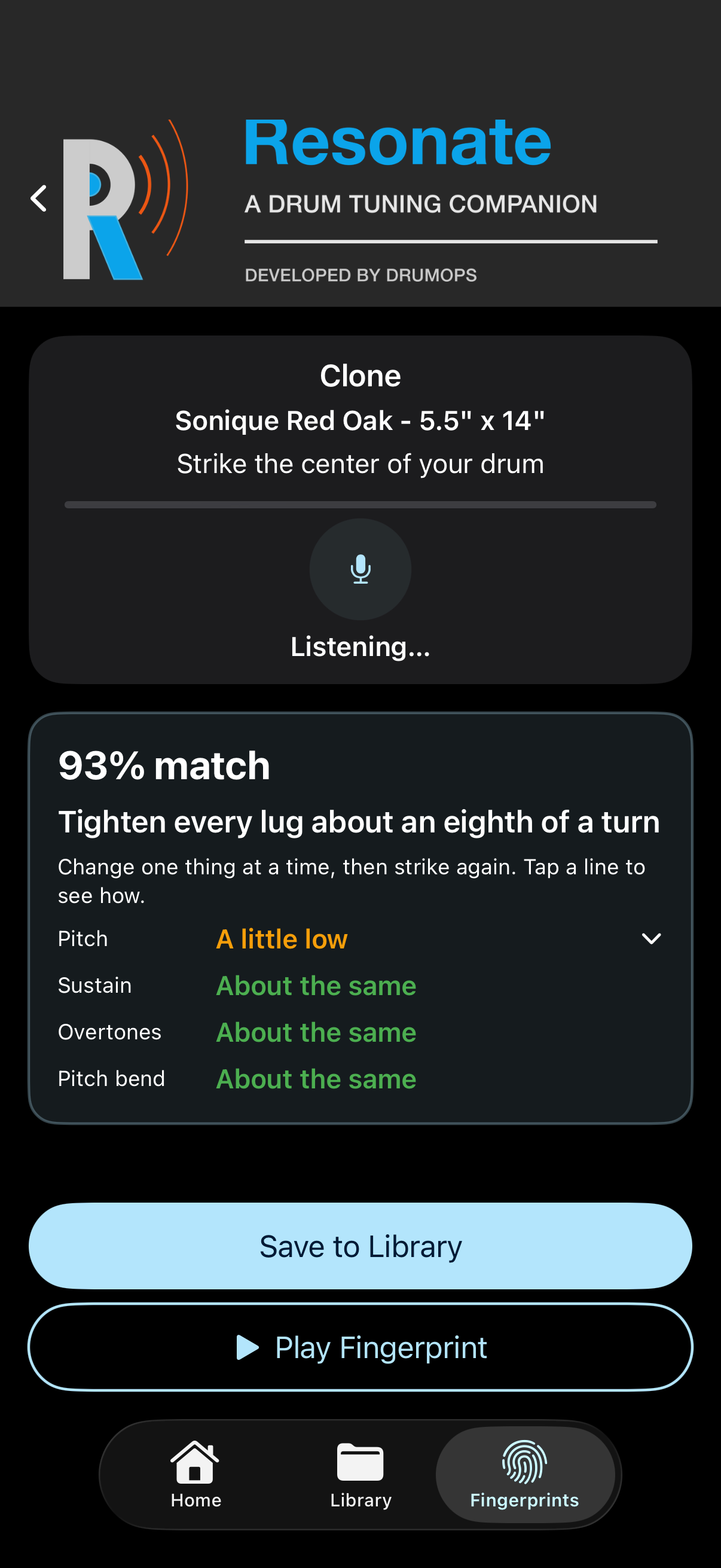
Clone is the other half. Pick a fingerprint and Resonate plays the recording back so you can hear what you are chasing, then asks you to strike your own drum in the same spot. It listens to both and scores how close the two sound as a match percentage. Below the score it tells you the one thing to change first, then compares pitch, sustain, overtones and pitch bend in words, like "a little low" or "rings longer". Tap any of them to see how to fix it, with a place to start such as a quarter turn on every lug. Change one thing, hit again and watch the score move.
To watch it first, pick Fingerprint & Clone under See it in action in Quick Overview. Resonate records a demo drum as a fingerprint, then strikes a second drum three times on the real Clone screen, about 30 seconds with a caption at each step: a little low so tighten every lug, then rings longer so add a little muffling, then a match. The demo's fingerprint is held only until the demo ends, so nothing is saved, and it needs no drum and no microphone.
When your drum sounds right, save it to your Library, all on one screen. Pick a collection or make a new one, then describe the drum you tuned with the same choices Add Drum gives you. Resonate adds it as a new drum and keeps your last strike on it as a recording, marked with the fingerprint it was cloned from, and Go to Library takes you straight to it. Nothing measured is saved, the match score included. Tuning the new drum is up to you.
A fingerprint stays a recording. Resonate analyses it afresh on every comparison rather than reducing it to a stored number, which means a capture you made a year ago is measured by today's engine. Captures also record whether the drum was struck in front of you or played back through speakers, because the two are not directly comparable and Clone says which one it is holding.
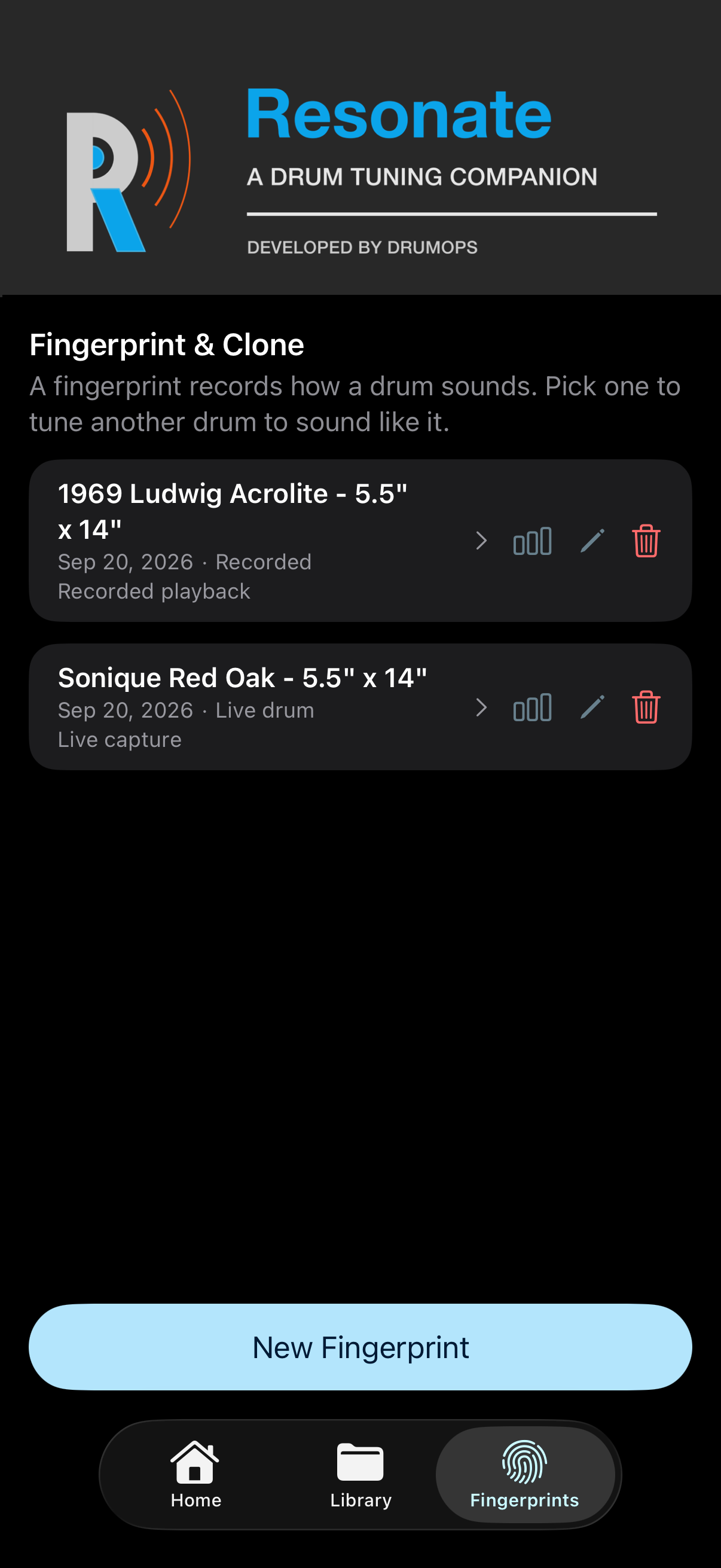
Your Fingerprints
Every capture lands in one list, newest first with the name and notes you gave it and a mark showing whether it was struck live or played from a recording. Rename a capture or rewrite its notes whenever you like. The recordings themselves never change.
There is no cap on how many you keep, and Resonate never uploads what you capture.
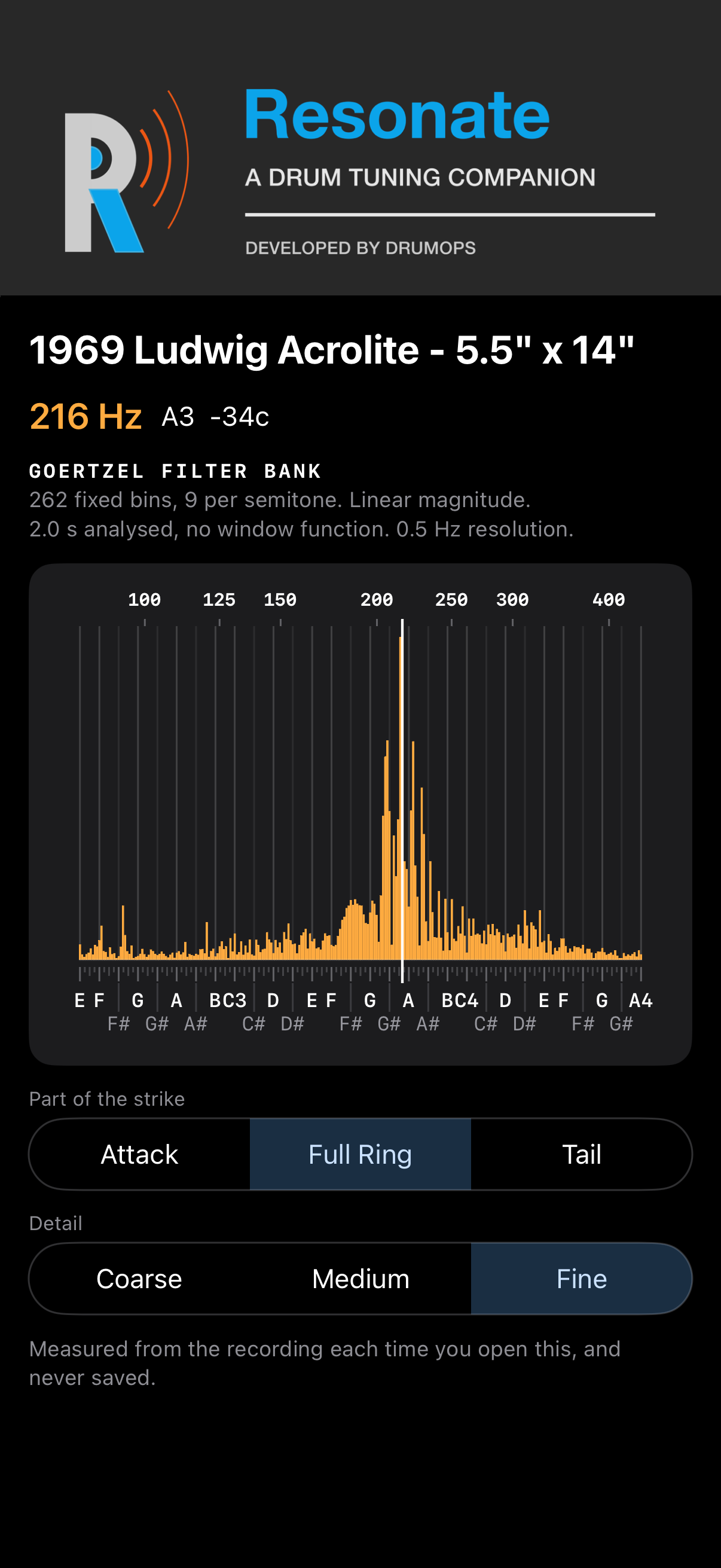
Open a capture to see where its sound sits, from E2 to A4, across the attack, the full ring or the tail. It is drawn from the recording each time you open it and never saved.
Tuning Setup
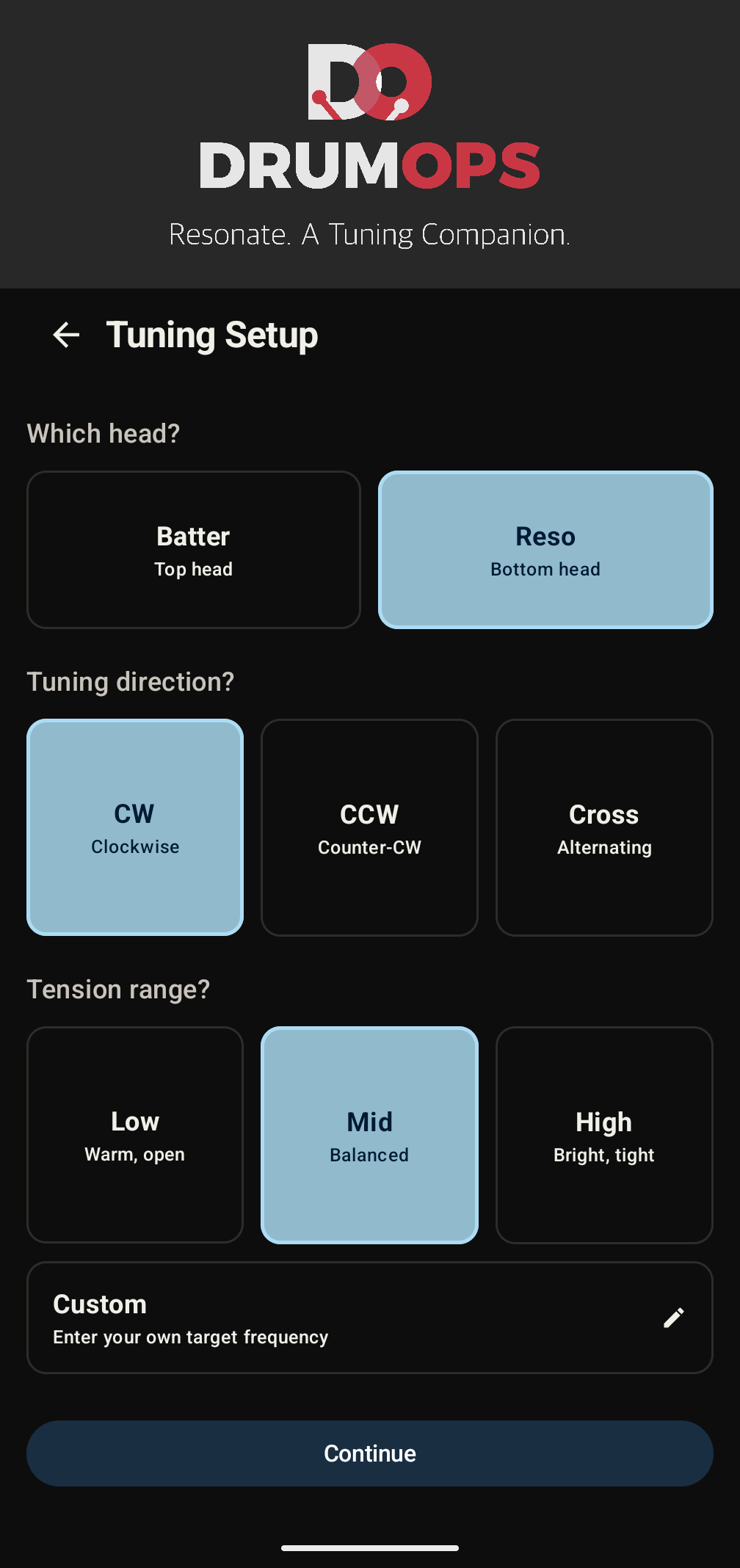
Before you pick up your key, Resonate asks three questions: which head you're tuning (batter or resonant), the tensioning sequence that suits your preference (clockwise, counter-clockwise, or the opposite-lug cross pattern), and the tension range you are working toward.
The tension range describes the sound you are after rather than setting a number: Low for a warm, open feel, Mid for a balanced, versatile tuning, High for a bright, punchy sound. If you want the head measured against a figure, enter your own target frequency in Hz. That option is there for drummers who know exactly what they want, whether that is matching a sample, replicating a previous kit, or hitting a specific musical interval between heads.
Lug-by-Lug Pitch Detection
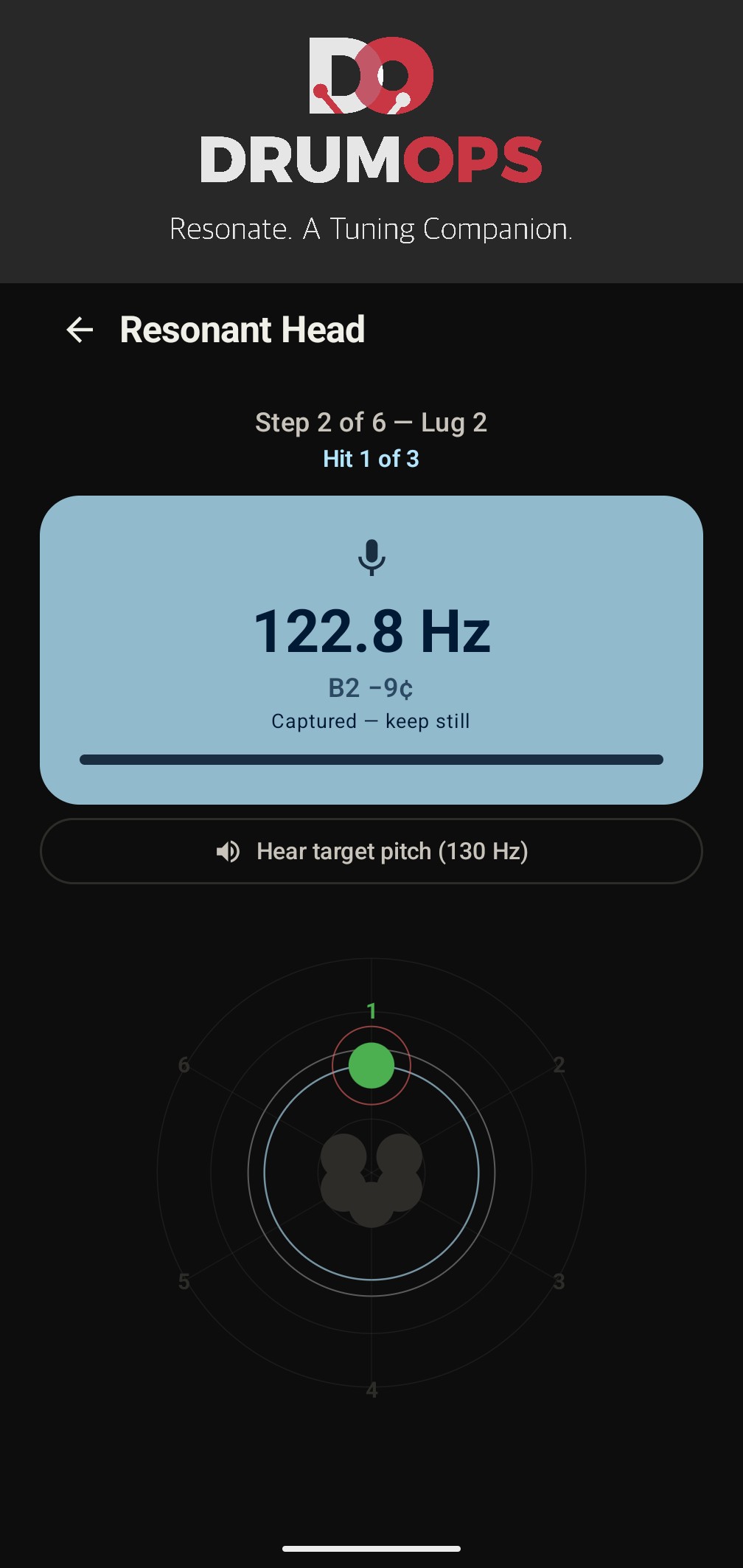
Resonate guides you to each lug in the sequence you chose. Hold your phone near the drum and strike the head close to each lug position in turn. Resonate listens through your phone's built-in microphone, with no clip-on sensors, no hardware attachments and no physical modifications to the drum, and detects the pitch produced by each section of the head independently.
Before the first lug, Resonate lists four habits that keep readings steady: set the drum on a towel, cushion, rug, carpet, or drum throne so the other head is muted, rest a finger lightly in the center of the head, tap softly about an inch in from the lug, and keep the phone in the same spot for every lug. On a snare the list starts by asking you to turn the snares off, since the wires change the pitch Resonate reads, and asks for a firm strike, the same way each time, in place of a soft tap.
To see it before you reach for a drum key, open Quick Overview on the Home screen (it also appears the first time you open the app) and pick Lug Tuning under See it in action. Resonate plays a snare for you on the real Lug Tuning screen, about 50 seconds with a caption at each step: three hits per lug, a soft hit marked yellow, a low lug named and fixed, and an even head at the end. It needs no drum and no microphone.
When you are ready for your own drum, pick Tune your first drum in the same menu. Resonate walks you through a first Lug Tuning with a tip at the bottom of each screen, from choosing the drum to an even batter head, and on the lug screen the tip changes with each hit: which lug is next, which one to turn and which way, and when the head is even. Hide tips turns them off for the rest of that tuning.
Resonate measures pitch acoustically using only your phone's built-in microphone. It does not use any external hardware sensor, vibration transducer, or physical attachment to the drum or its hardware.
Pitch detection is timed to the decay phase of the hit, the sustained ring that follows after the attack transient fades. The decay window is where the drumhead settles into its natural resonant frequency, producing a far cleaner and more stable reading than the noisy attack itself. This approach works reliably even in live rooms, on drums with heavy muffling, and with less-than-perfect center hits.
On a snare, Resonate reads each strike on its own from the ring that follows it, one tone at a time, because a snare head rings several tones at once and the attack mixes them together.
Three Hits, and the Median Wins
A single measurement can be thrown off by an off-center hit, a background noise spike, or a stray vibration from another drum. Resonate takes three steady hits per lug rather than one, waiting for the signal to fall silent between them.
Every hit you play is kept. The reading Resonate records is the median of the three, the middle value, so a single odd strike sits at one end and cannot pull the result with it. Nothing is thrown away, hidden, or quietly replaced, and the app never restarts a lug on your behalf.
Three segments under the reading fill in as the hits land, each labelled with its hit. A hit more than 2% from the lug's median turns its segment yellow, and on a snare so does a strike that was too soft. The segment is only a mark: the hit still counts toward the reading. When the head is done, each lug's card shows its three segments.
If the three hits spread more than 5% apart, Resonate tells you by how much and leaves the decision with you. A wide spread is often the drum talking rather than your technique. A lug that genuinely will not settle is worth knowing about, and re-hitting it is one tap away.
The Tension Radar
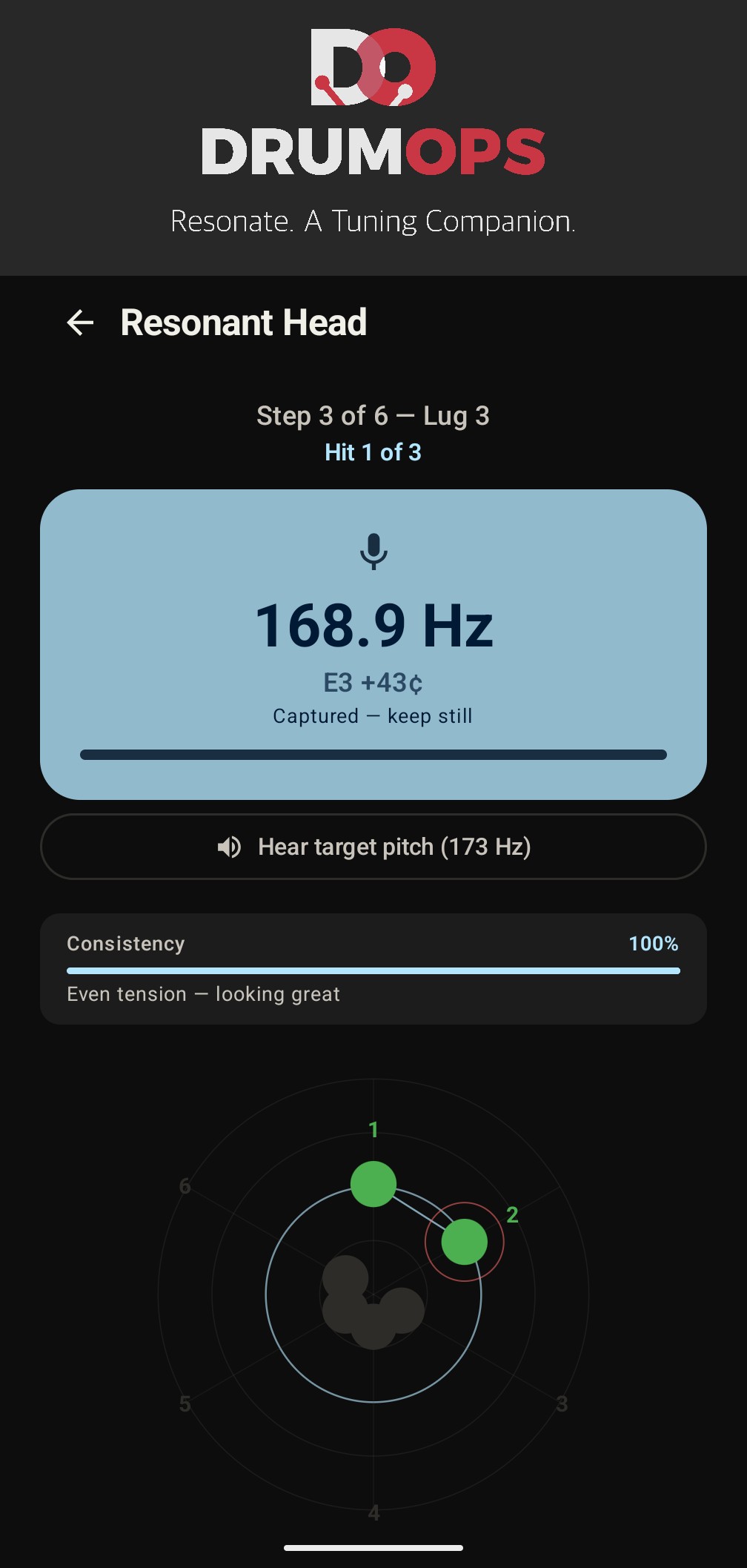
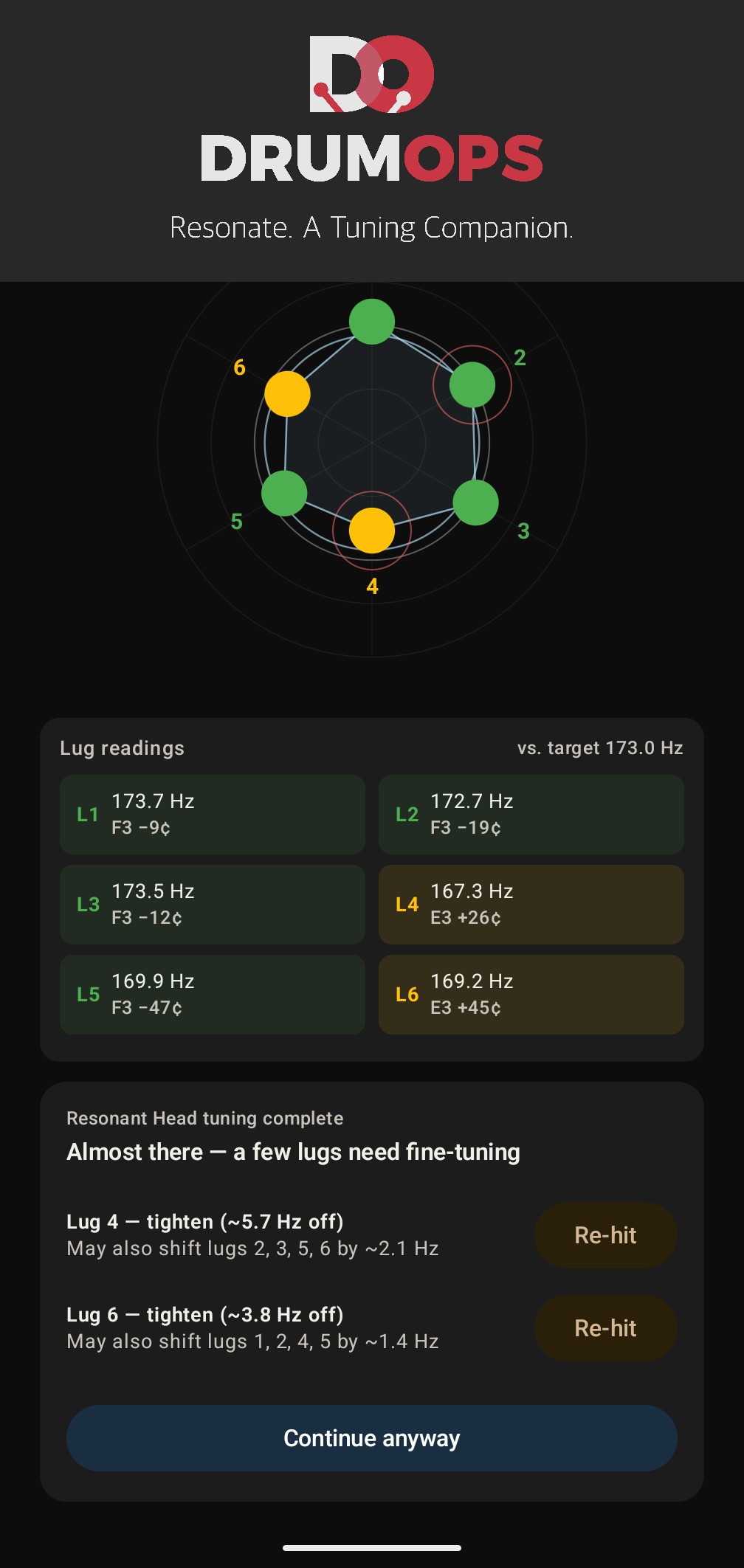
As you work around the drum, each lug's recorded pitch appears on a radar chart. Each spoke represents one lug; the distance from the center corresponds to the measured frequency. A perfectly even head produces a regular polygon. Zones that are over-tightened push outward; under-tensioned lugs pull in.
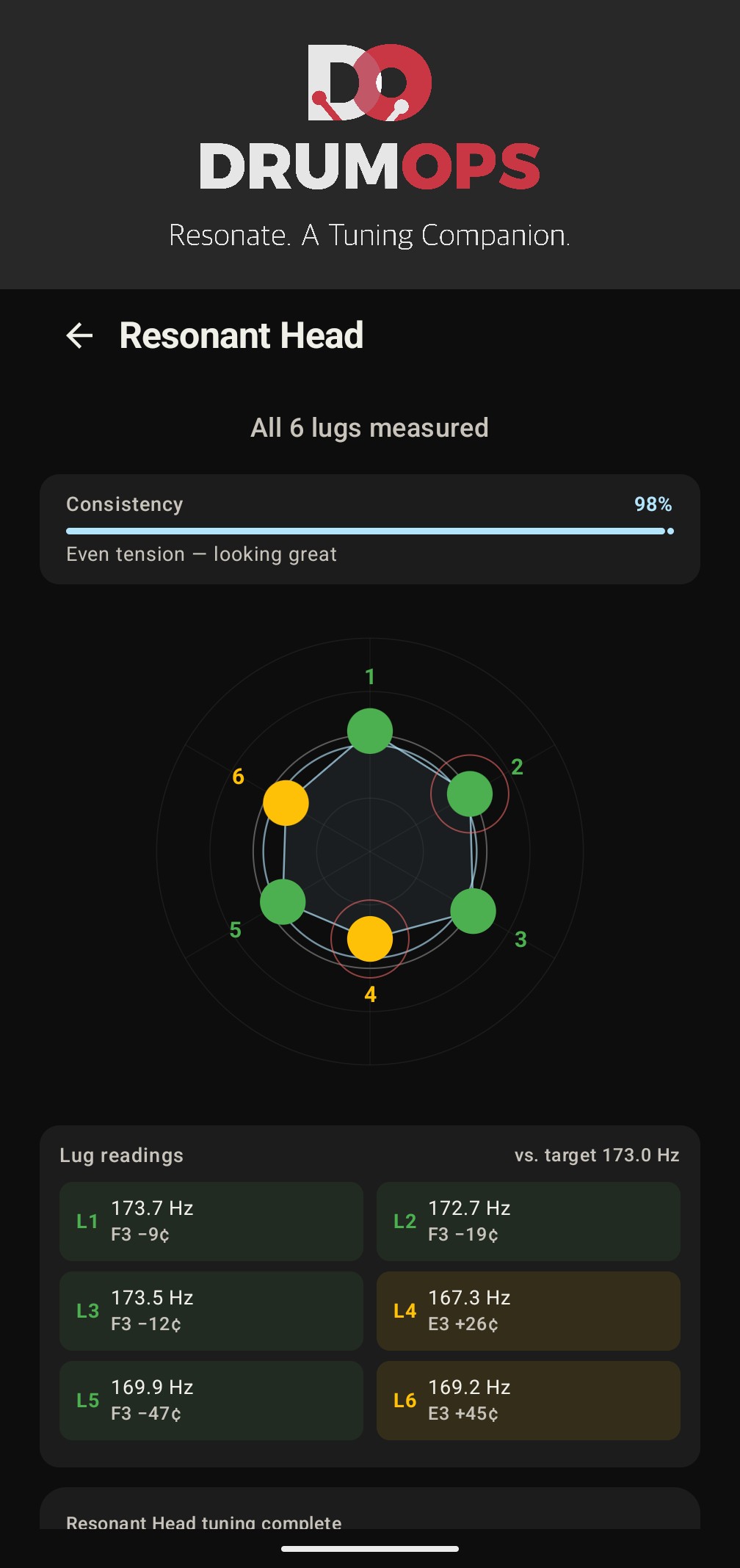
Dot color reflects how far each lug sits from your target frequency, or from the head's own running average when you have not set one:
- Within 2% of target, in tune
- 2 to 5% from target, close, may need adjustment
- More than 5% from target, needs attention
- Not yet recorded
A reference ring on the chart marks the running average of all recorded lugs. If you've set a target frequency, a second ring appears at that target, giving a visual anchor for how far the average sits from your goal.
Completion Review and Re-hit
When all lugs have been recorded, Resonate evaluates the head against itself. The completion card gives an overall status and lists every lug sitting more than 2% from the head's own average, ranked by how far out it is:
- Even tension. Looking great, a consistency score of 90 or above
- Getting there. A few lugs need attention, from 75 to 89
- Uneven tension. Keep adjusting, below 75
Each out-of-range lug has its own Re-hit button. Tapping it backs the session up to that lug, clears its previous reading, and starts its three hits again, without losing the other lugs' data. The radar updates live as the new reading is confirmed.
When you're satisfied, a Continue button advances to the next head or to the session summary. If any lugs are still out of range, the button reads "Continue anyway" so the decision is explicit.
Resonance Tuning
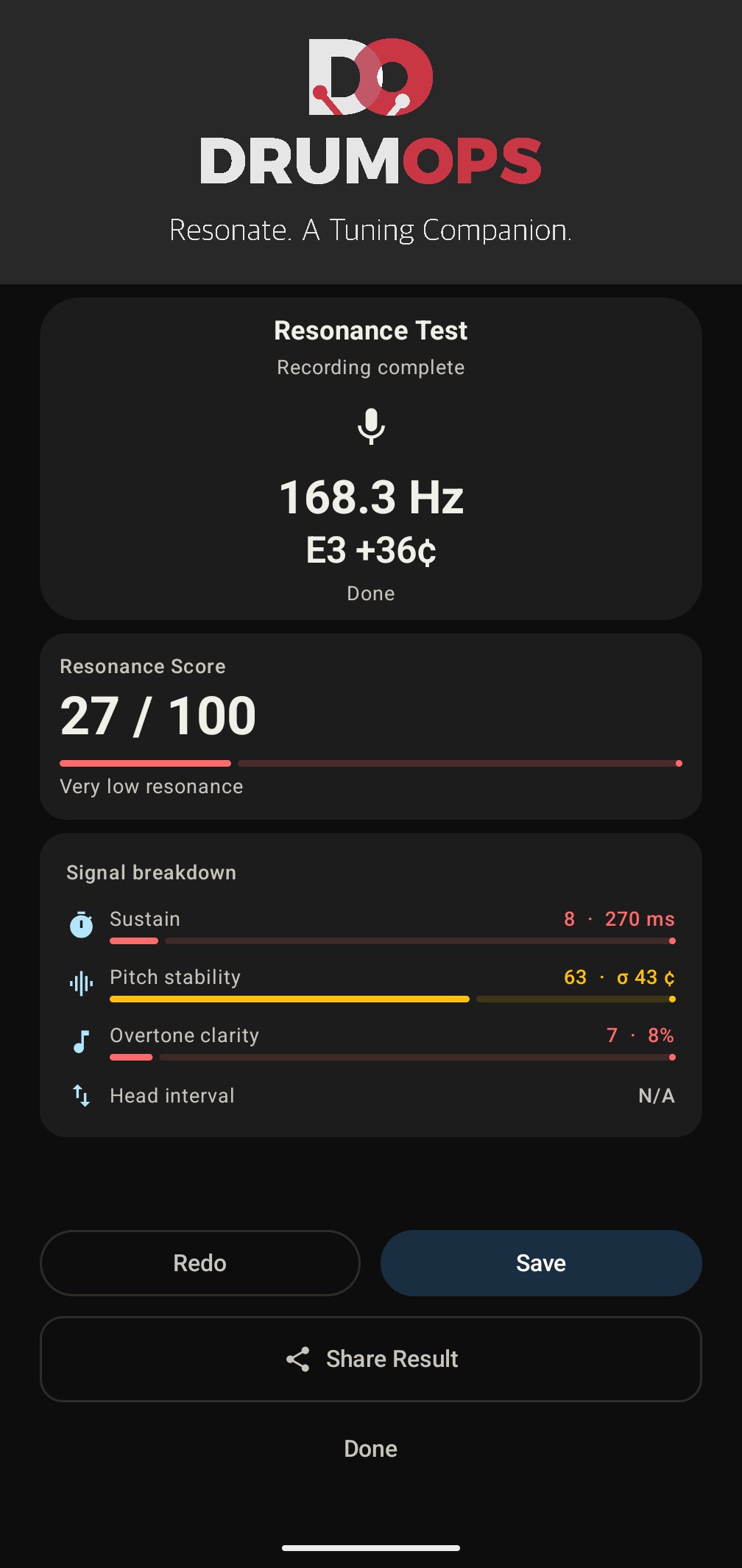
Beyond per-lug precision, Resonate's Resonance Tuning captures a composite score for each drum head, a single number from 0 to 100 that reflects how freely and consistently the head is resonating. The score draws on three acoustic properties measured across the decay window: pitch stability (how steadily the fundamental holds through the ring), sustain duration (how long the head rings before amplitude falls below threshold), and harmonic cleanliness (how well the overtones align to natural harmonic ratios rather than scattering into inharmonic noise). A property one strike doesn't give, such as pitch stability on a snare that rings too briefly to follow, shows as Not measured and is left out of the score rather than counted as zero.
Resonance Tuning is useful as a before/after reference: record a score before tuning, make your adjustments, record again. A higher score after tuning confirms the head is resonating more freely. A low score isn't always wrong just as a high score isn't always right. A muffled studio kick is meant to score low, and so the resonance score is a great feedback loop that confirms or denies that your setup is behaving as expected for the particular sound you are going for.
Below the score, Resonate names the one signal worth working on and how, and when everything it measured is on target for your sound profile it says there is nothing to change. To watch it first, pick Resonance Tuning under See it in action in Quick Overview. Resonate plays a floor tom aimed at the Open profile, about 30 seconds with a caption at each step: the first hit misses on sustain and the tip says to loosen the reso slightly, and after one small change the second hit matches Open. It needs no drum and no microphone.
When both heads have been measured, Resonate names the interval between them and describes what that interval tends to sound like. It does not tell you which one to want. The relationship between the two heads is one of the strongest levers over a drum's character: a reso tuned a minor third below the batter opens the drum up and adds sustain, and a reso closer to unison tightens the pitch and reduces bloom. Which of those you are after is a decision about the sound you want, so the app reports where you landed and leaves it there.
All audio processing, meaning pitch detection, decay analysis and harmonic scoring, happens entirely on your device. Resonate never transmits audio data or pitch measurements off your phone.
Fundamental Pitch Tuning
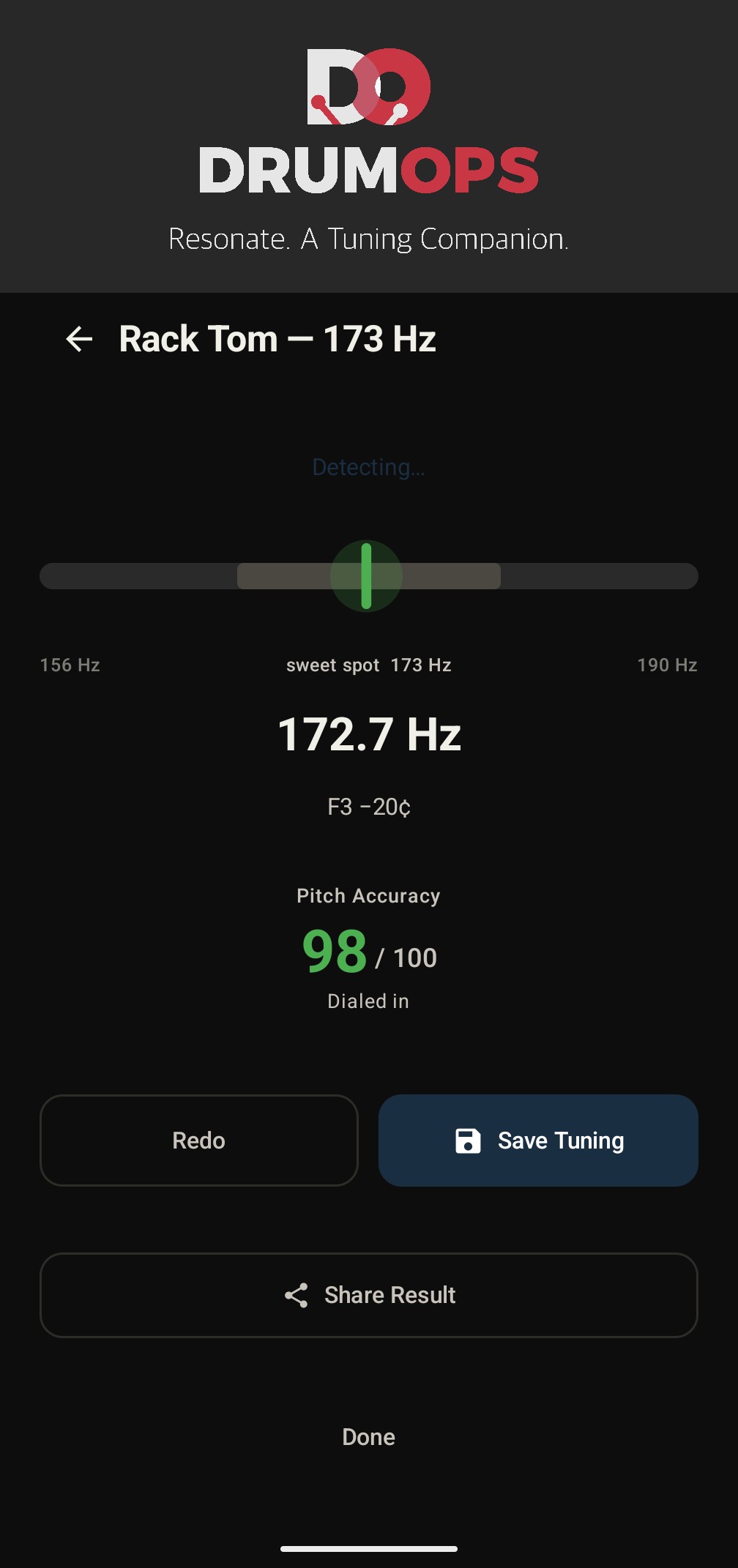
This is the standalone workflow for drummers who want to tune toward a specific pitch without going lug by lug. Pick the drum first, then the bar on the next screen covers the range a drum of that type reaches. Touch it and slide to the pitch you want, or type a frequency from 30 to 600 Hz or a note name such as A4 or C#3. That range is the band the detector reports, so the app never takes a target it could not confirm.
Low, Mid and High are shaded zones on that bar showing where drums of your type usually sit. They are reference marks rather than a recommendation, and the bar runs past them at both ends. Wherever you leave the handle, the screen reads "Your target" and the figure in Hz, because the figure is yours.
Then hit the drum. Each hit gives one reading, weighted toward the loud start of its ring, so the needle stays where the hit put it while the drum fades instead of following the quieter tones that ring on. The meter is a gradient around your target: green within 2% of it, amber out to 5%, red past that. Those are the same widths the lug radar uses, so green means the same thing wherever you meet it in the app. The needle takes the colour it is standing on, and underneath the screen says what to do about it, for example "Tighten evenly, 24 Hz to go". A Pitch Accuracy score from 0 to 100 sits below that, worked out from how far the drum is from your target and nothing else.
A microphone icon pulses whenever the app can hear the room, which is a different question from whether it heard a pitch: a strike that was too soft looks different from a screen that is not listening. A level bar under it moves with every sound the microphone picks up, and if it hears nothing at all for three seconds the screen says so. Between strikes the last reading stays up, dimmed and marked as the last strike, so you can read it while you turn the key. Nothing is saved.
To watch it first, pick Fundamental Pitch Tuning under See it in action in Quick Overview. The demo's drummer has already chosen 196 Hz for a rack tom, and Resonate plays five hits on the real meter, about 30 seconds with a caption at each step: red and tighten, then amber, then a little past so loosen, then green twice. It needs no drum and no microphone.
Fundamental pitch tuning runs entirely on your phone mic, just like the lug-by-lug workflow. No clip-on sensors, no hardware attachments, no subscription required.
Interval Tuning
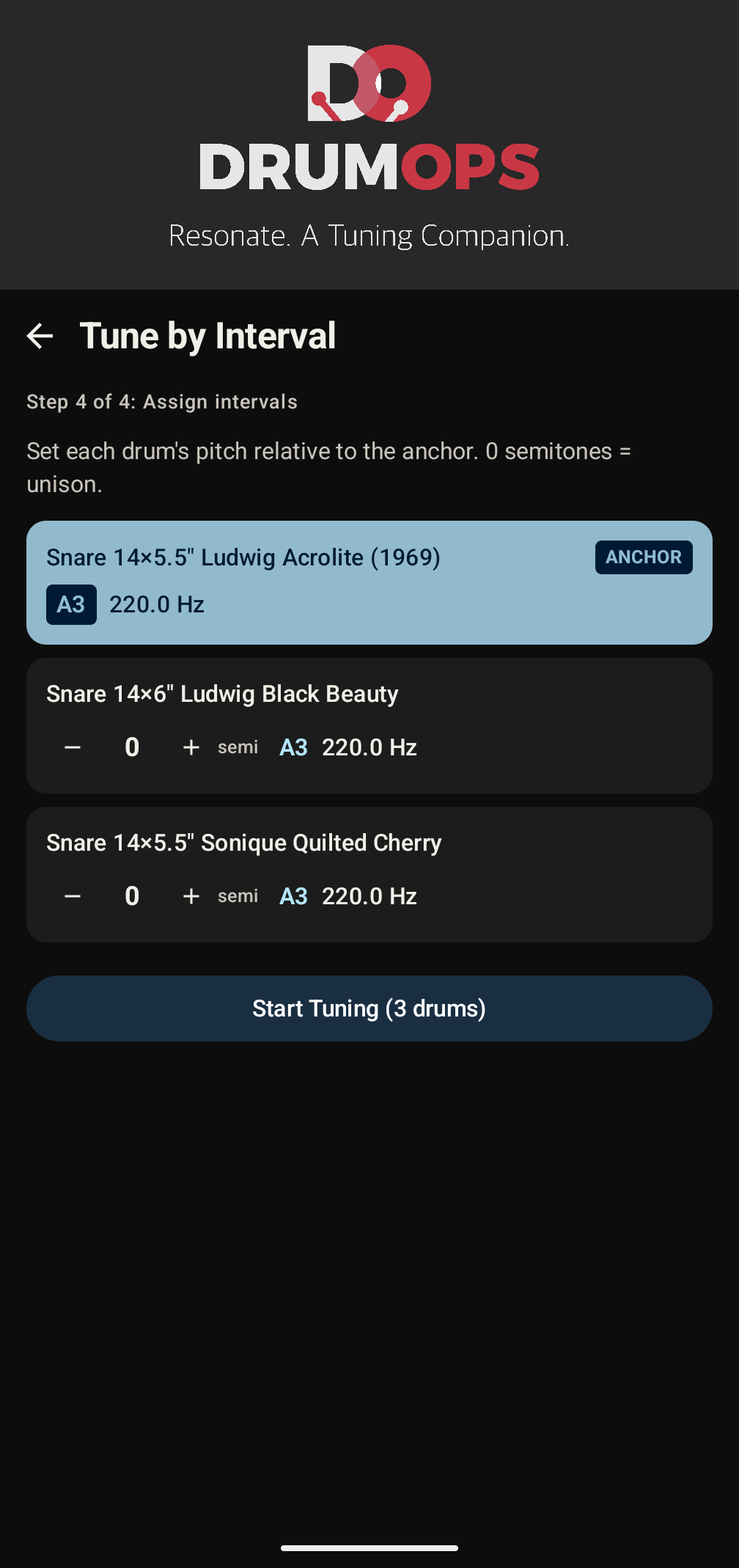
Interval tuning extends the workflow to a whole collection, in four steps: select a collection, select the drums to include, measure one drum as your reference, then pick a note for every other drum.
The reference is a real drum, not a setting. If it is already tuned, strike its center three times and Resonate takes the median. If it is not tuned yet, set a target, tune it on the built-in tuner, then measure it. Either way the note list is built from what the drum actually sounds like, never from the number you typed.
From that measurement Resonate lists standard note pitches an octave either side of the reference drum's note, each with its frequency and the interval it makes, for example a perfect fourth above your 12" rack tom. Nothing is preselected and nothing is marked as suggested. You pick the note for each drum, and Start Tuning stays disabled until every drum has one. The reference drum is not in the queue itself. It is already where you want it.
You can also start it from a kit in your library. A kit's menu offers Interval Tuning with that kit's drums already chosen, so you begin at selecting drums, in three steps instead of four.
If you have to stop partway, the home screen offers the session back with the drums still owed and the next one named.
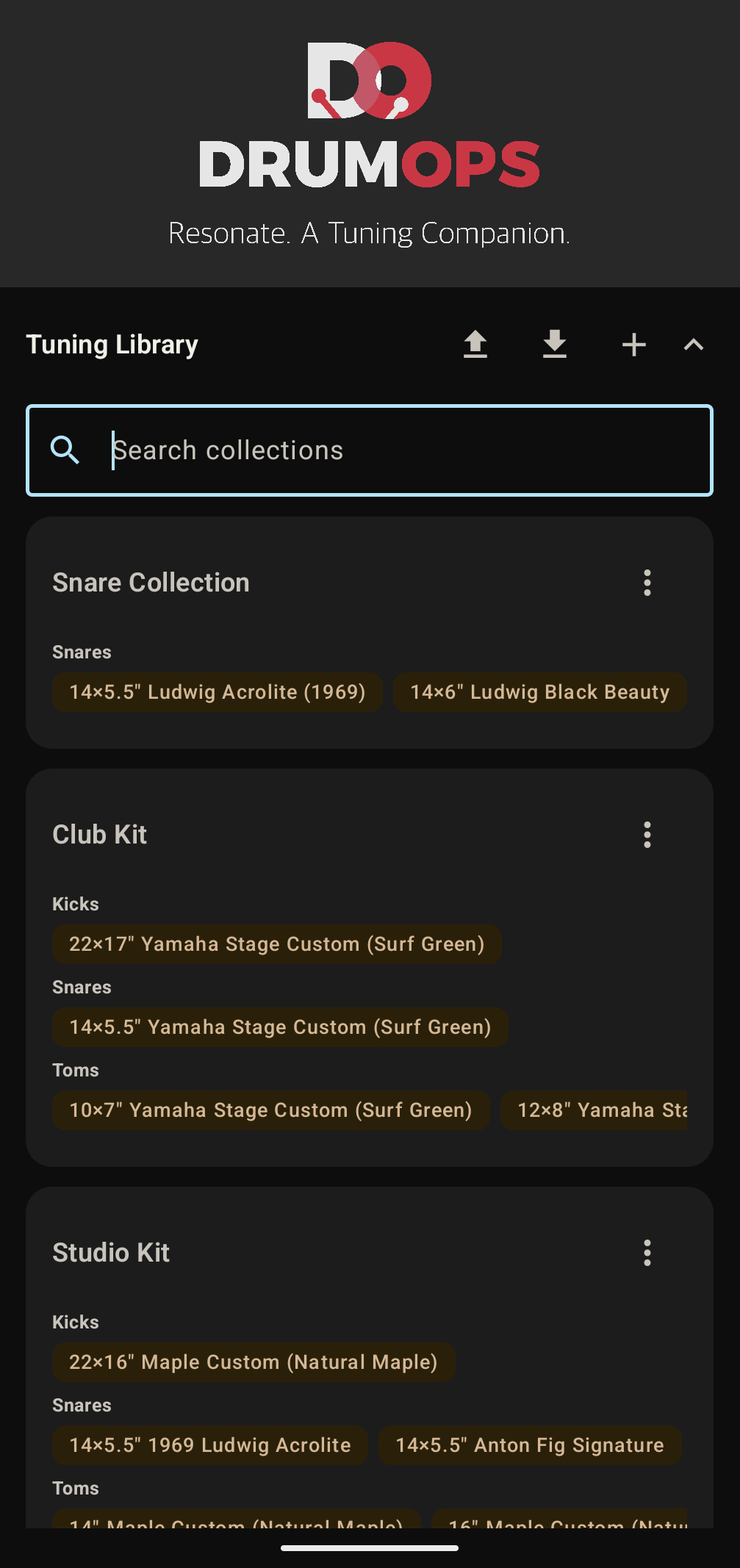
Your Drum Kit Library
Collections hold the drums you own: type, size, depth and lug count for each one. Build a touring kit, a studio kit and a snare collection, and pick the one you are working on when you start a tuning or an interval session. Each drum's menu starts Resonance Tuning, Fundamental Pitch Tuning or Lug Tuning on that drum, with its type, size and lugs already filled in. Each card reads the drum's type, size and lugs on one line, for example Floor | 16" x 16" | 8 Lugs. Move, in the same menu, takes a drum and its clones into a kit, out of one, or to another collection. It lists every collection with its kits under it, one line each, and you can search it when your library is large. Hold a drum and drag it to put the drums in the order you like.
A collection can also hold kits, for drums that belong together. Keep a "Studio Kits" collection with a kit for each set you own, such as Yamaha Maple Custom (1992 vintage), and each kit is one row in the collection, opened with a tap, so five kits stay easy to read. Not every drum has to be in a kit: a collection of 10" toms can simply hold drums. Kits read A to Z until you drag them into your own order. A kit's menu starts Interval Tuning on its drums, renames it, moves it with its drums to another collection, or deletes it. A kit added, renamed or moved beside another of the same name is numbered, Gretsch (1), the way a computer names a second file.
The library is a roster, not a log. Resonate does not keep a record of what a drum measured last month, and it does not store a pitch for you to tune back to. If you want to come back to a sound, record it with Fingerprint, which keeps the drum as audio.
A drum can also hold clones. When Clone gets one of your drums sounding like a fingerprint, save it to a collection as a new drum, and its card shows which fingerprint it was cloned from and the date you saved it. Open it later to tune the drum back to that sound.
Deleting a collection deletes its kits and all of its drums with it, along with any clones saved on them. Deleting a kit deletes its drums, so move a drum out first to keep it. Resonate asks before either.
Back Up and Restore Your Library
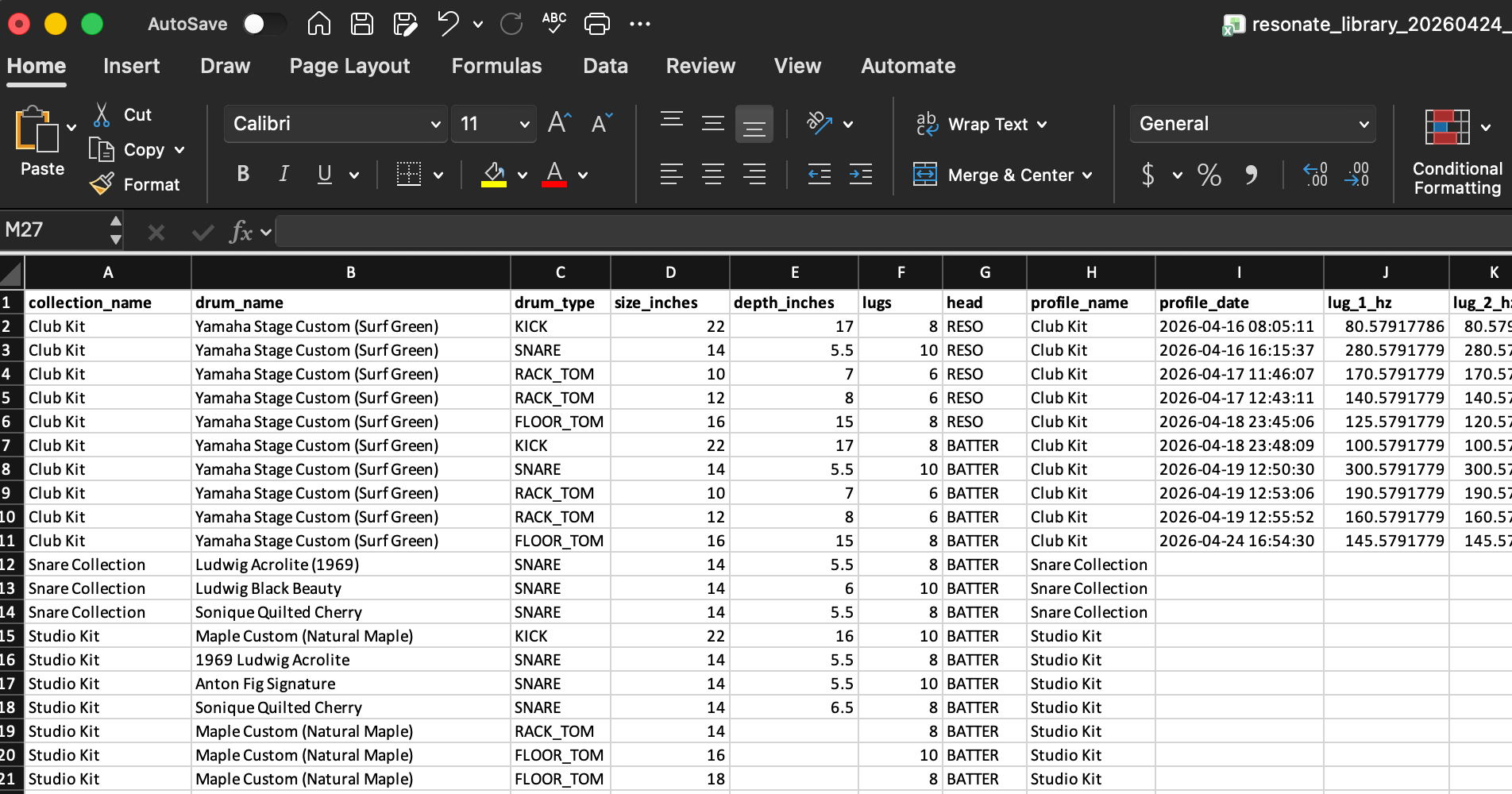
Your tuning library is yours, not only kept within the confines of the app. Tap the export button in the library header and Resonate packages your data into a single .xlsx file and opens the system share sheet. Save it to Google Drive, email it to yourself, or drop it in Dropbox. No account required, no app dependency. You can update your collection in the file or in the app.
The file contains two sheets. The Collections sheet is your drum roster: every collection, every drum, sorted alphabetically by collection and then in the order you dragged the drums into. Each row is a drum with its kit, type, diameter, depth and lug count.
The Field Guide sheet documents every column: which ones you can fill in yourself and what values are accepted. You can add whole collections and drums by hand with collection_name, drum_type, size_inches and lugs, which is the quickest way to get a large kit into the app. Fill in kit_name to put a drum in a kit inside its collection; the kit is made if it does not exist yet.
To import, tap the upload button and pick your .xlsx file. Any collections or drums not already in your library are added. Existing drums are never overwritten or duplicated.
Everything described above is included: every tuning method, interval tuning, unlimited collections and fingerprints, and export and import. Resonate is a single purchase with no subscription and no in-app purchases.
For the acoustic science behind pitch detection and what the resonance score measures, see the full technical breakdown.
Questions or feedback? admin@soniquedrums.com